GPS timestamp cameraPhotos that
Conota is a GPS timestamp camera for iPhone, iPad and Android. Every photo carries the project, a note, the position and the time, on the image and in the file name. It's free to download, and built for people who photograph work in the field and the companies that need those photos filed.
Used by organizations worldwide








- Professionals use it
- 500,000+
- Photos taken every day
- 1.5M+
- Saved per person, every week
- 1 h 45 min
*From a 2025 survey of 218 Conota users worldwide, compared with the phone's own camera app.
Two hundred photos called IMG_20261005.
A notebook full of notes. An evening to match them up.
- IMG_20261005_101902.jpg
- IMG_20261005_102531.jpg
- IMG_20261005_104007.jpg
- IMG_20261005_110256.jpg
The chainage and notes are on paper, and back at the office, someone matches them to the photos. Across a crew, every phone names and stores photos its own way, if it names them at all, and when someone leaves, their photos leave with them.
- A87_Ch12450_Pothole-L2_20261005_101902.jpg
- A87_Ch12600_Edge-cracking_20261005_102531.jpg
- A87_Ch12780_Drain-blocked_20261005_104007.jpg
- A87_Ch13240_Guardrail-gap_20261005_110256.jpg
Conota puts the note in the file name while you're still on site. There's nothing to match up later.
One photo does the paperwork.
What you type on site travels with the photo everywhere: on the computer, in reports, in the cloud.
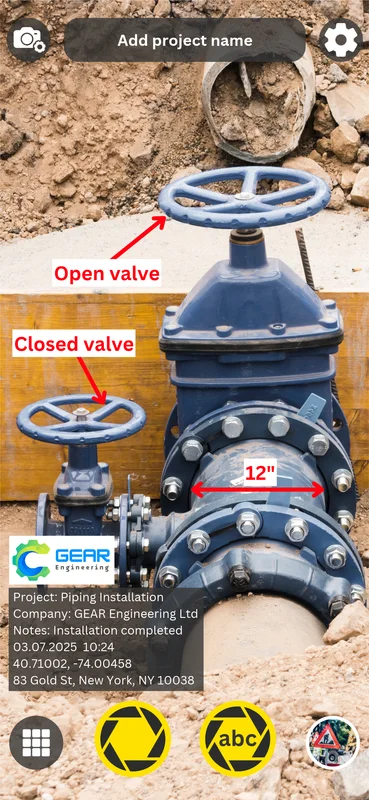
1. Shoot and note.
Take the photo and type your note, chainage or milepost on the spot. Works with no signal.
2. In the office before you are.
Photos land in your own OneDrive, SharePoint or WebDAV folder as they're taken.
3. Named, filed, found.
The note becomes the file name. Search "pothole" and it's there in seconds, on any computer.
Every file, how you need it, where you need it.
Set the stamp, the file names and the logo once. Every phone follows.
Save time every week
Users report saving about 1 h 45 min a week.
Photos you can audit
The same stamp, file name and logo on every photo.
Photos stay yours
Straight to your own OneDrive, SharePoint or WebDAV.
Common questions
How do I put a date and time stamp on photos?
Take the photo with Conota. The date and time land on the image metadata and file name as you shoot, along with the position and any note.
Is Conota free?
Conota is free to download, and the free version stamps every photo, with a Conota watermark. Pro removes the watermark and the ads, and adds annotations and dimension lines on the photo, note editing, the project catalog, a searchable gallery, PDF reports, KMZ and CSV export, sync to your own OneDrive and national coordinate systems. You upgrade in the app.
Is Conota on iPhone, iPad and Android?
Yes. Conota is free to download on the App Store and Google Play, and it works the same on iPhone, iPad and Android.
Does it work with no signal?
Yes. The coordinates, time and file name are all made on the phone, and photos sync to your storage once you're back in range.
Which coordinate systems does it stamp?
More than 25, including WGS84, UTM, MGRS and USNG, State Plane (NAD83, in US survey or international feet, for every US state), British National Grid, Irish Grid, ETRS89, MGA2020, Gauß-Krüger, SWEREF99, RD and Swiss Grid. WGS84, UTM and MGRS are free; State Plane and the other national systems come with Pro.
Can our field photos go straight into our own SharePoint or OneDrive?
Yes. Pro syncs photos from each phone to the person's own OneDrive. With add-ons, photos sync over encrypted connections to company OneDrive and SharePoint folders, including each project's folder, or to your WebDAV server.
Does Conota support single sign-on (SSO)?
Yes, on a corporate license. Currently, that's Microsoft Entra ID (formerly Azure AD). Staff sign in with their company login, and when someone leaves, removing their company account ends their access to Conota too.
How do we set up a whole team?
Get in touch with Michael: book a call or answer a few questions online. The Conota team sets up your seats, plus single sign-on and company settings if you need them. Your crews then sign in to the same app from the App Store or Google Play.
Setting up a team?
Get in touch with Michael, the founder and former civil engineer behind Conota, and our team will set up your team license and any add-ons.
Free to download on iPhone and Android